uploadwords .com ai: A Plain Guide to the Free Word Counter and Word Cloud Tool
If you don’t want to read the whole guide or have difficulty reading, you can listen to this guide instead.
You paste a draft into a website and wonder whether it is too long, which words you repeat, and what the piece is really about. That is the job uploadwords .com ai is built for. It is a free browser tool that counts your words, lists your most used terms, and turns them into a word cloud in seconds.
At AI Holic, we checked the live homepage ourselves on 8 November 2026 and read the guides that already rank for this keyword. The guides disagree on accounts, prices, and file uploads, so this guide sticks to what the live site actually shows.
You will learn what the tool does, how to use it, what a word cloud can and cannot tell you, how it compares with free alternatives, and what happens to your text. By the end, you will know whether it fits your writing routine.
The Short Answer
In short, uploadwords .com ai is a free text analysis tool that runs in your browser. You paste text into the page and it returns a word count, a character count, a list of your most frequent words, and a visual word cloud. There is no account to create and nothing to install.
uploadwords .com ai suits quick checks, not full editing. It measures your text. It does not fix grammar, judge your argument, or rewrite a weak paragraph.
That limit is a feature, not a flaw, because it keeps the tool fast and simple. If you need a fast answer to how long a draft is and which words dominate it, this tool gives it in seconds. If you need editing help, pair it with a real editor and a careful read.
| What you get | What it tells you | Who uses it most |
|---|---|---|
| Word count | How many words your text has | Students and writers |
| Character count | How many characters, with and without spaces | Marketers and social media writers |
| Top keywords | Which words appear most often, and how often | Bloggers and SEO writers |
| Word cloud | A visual summary of your most frequent words | Teachers and presenters |
| Export and copy | Your results saved or copied for reports | Researchers and teams |
What Is UploadWords .com AI?
UploadWords is a small online utility that answers one question about a piece of writing: what is in it, measured. Its homepage says it plainly: upload or paste text and instantly get word count, top keywords, and word insights, 100 percent free. The page also carries the line “No signup, fast, privacy-first” under the headline.
We read the live page ourselves on 8 November 2026, and the sample on the page showed 1,248 words, 6,630 characters, and a top word of “design” used 42 times. That sample shows the tool working on real text, not a promise.
The tool is part of a wider shift toward light browser utilities. Writers no longer want to open a heavy program for a simple check. They want to paste text, see the numbers, and move on.
A word count is simply the number of words in a document or passage of text. Word counting matters when a text must stay within set limits. That is true in school work, in journalism, in legal writing, and in advertising.
It also helps translators price a job and helps writers measure reading speed. UploadWords gives you that number the moment you paste.
The name can mislead in two directions. It is not a place to store files, and it is not a keyword research tool that tells you what people search for on Google. It counts the words you give it and shows which ones you use most.
That is the whole job, and the tool does it without asking for your email. The site also runs a small blog with how-to guides. The guides on its homepage cover building a word cloud, finding top keywords from any text, and the difference between keyword density and keyword frequency.
How to Use It in Three Steps
Using uploadwords .com ai takes under a minute. The homepage lays out the same three steps we list here, and there is no account step hidden between them. You open the page, you paste, you read the results.
- Step 1: Paste or upload. Paste your text into the editor on the page. File uploads are listed as coming soon on the site, so pasting is the input that works today.
- Step 2: Analyze. The tool counts your words and characters and ranks your most used words at once. The results appear on the page without a wait.
- Step 3: Download or copy. Copy the results for your own notes or export them for a report. You can also preview the word cloud and download it as a picture.
Start with a finished draft, not a half-written paragraph. A complete draft shows real patterns across the whole text. A fragment shows only the words you happened to use in that part, which tells you little about the piece as a whole.
Read the keyword list before the word cloud. The list gives you exact numbers. The cloud gives you a picture.
Numbers first keeps you honest, and the picture then makes the pattern easy to share with a class or a team. One more check matters before you trust the numbers. Make sure you pasted the full text, including any part you added at the end.
A missing final paragraph changes the count and the keyword ranking, and the tool can only measure what it receives.
The Word Cloud, Explained
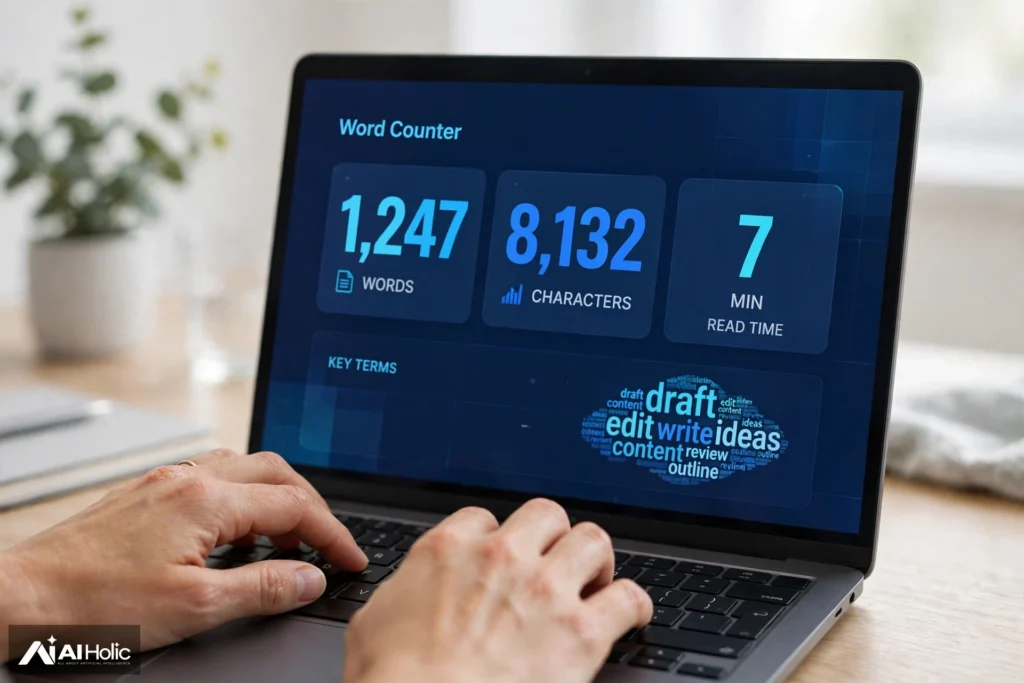
The word cloud is the most visible part of uploadwords .com ai, and the easiest to misunderstand. A word cloud, also called a tag cloud, is a visual representation of text data in which the importance of each tag is shown with font size or color. A text cloud shows word frequency in a given text as a weighted list.
In plain terms, the words you use most appear biggest. That picture is useful for one thing: spotting the dominant topic at a glance. If your essay is about climate policy and the biggest words are “climate”, “policy”, and “emissions”, the cloud confirms your focus.
If the biggest word is “very” or “really”, the cloud has caught a habit worth fixing. Teachers use clouds in class for the same reason. They make a pattern visible in seconds.
But a cloud cannot judge your writing. It cannot tell you whether your argument holds, whether your facts are right, or whether your tone fits your reader. It counts words.
It does not read them. A cloud built from a polished essay and a cloud built from a weak one can look the same if both repeat the same words. Use the cloud as a starting point, not a verdict.
If the picture surprises you, open the keyword list and check the numbers. If the numbers confirm the surprise, revise the draft. If they do not, trust the numbers and move on.
For more background on how these visuals work, see the word cloud reference on Wikipedia.
UploadWords vs Free Alternatives
uploadwords .com ai is not the only free word counter, so the honest question is when it wins and when another tool fits better. The table below compares it with the free options that working writers mention most. The facts come from the comparison guides we read during the harvest.
| Tool | Best for | Signup needed | File upload | Word cloud |
|---|---|---|---|---|
| UploadWords | Fast counts plus a word cloud | No | Coming soon | Yes, with PNG download |
| WordCounter.net | Full stats and readability insights | No | Yes, PDF, DOC, and DOCX | No |
| Google Docs built-in counter | Counting inside a document you already edit | Yes, Google account | Opens its own documents | No |
| Microsoft Word built-in counter | Counting inside Word | Yes, paid app | Opens its own documents | No |
UploadWords wins on speed and on the visual summary. Nothing to install, no account, and a word cloud no other tool on this list offers. That makes it the best pick when you want a quick check and a picture to share.
It loses when you need file uploads today, readability scores, or a thesaurus. WordCounter.net is the stronger pick for those jobs, and it is one of the most established free counters online. The built-in counters win in a different way.
If you already write in Google Docs or Word, the counter is right there and you never leave your document. The trade is that you need an account or a paid app, and you get no word cloud and no keyword frequency list. Pick the tool that matches the job, not the one with the longest feature list.
Comparing alternatives is a normal step before you settle on any AI tool, and the same habit applies to full AI products. Our guide on alternatives to Forethought AI shows how that comparison works for a customer support tool. The method is the same here: list what you need, test two options on the same text, and keep the one that fits.
Who Should Use It
Students get the clearest value. An essay with a strict word limit is easy to check in seconds, and the keyword list shows whether one term is repeated too often. The no-signup step matters on a shared computer, where creating yet another account is a real annoyance.
Writers and bloggers use it before they publish. A quick count confirms the draft meets the planned length. The keyword list catches accidental repetition before readers do.
The word cloud shows whether the piece stays on topic. For writers who also use AI helpers, our guide on AI for writing covers the wider set of tools that sit around a draft like this one.
Marketers and social media writers use it for character limits. A post that must fit a platform limit needs an exact character count, not a guess. Reading time estimates help too, since they show whether a piece fits the format it was written for.
Researchers and teachers use it for review work. A researcher can scan interview notes for the most frequent terms before a closer read. A teacher can turn a class text into a cloud and start a discussion from the picture.
In each case the tool saves minutes, not hours, and that is enough.

Privacy: What Happens to Your Text?
Privacy is the first worry with any online text tool, and it should be. You paste unpublished work into a page you do not control, so you should know what the site does with it. The UploadWords homepage answers that question in its own FAQ with a plain no: your text is not stored or shared.
That is the site’s own statement, and we quote it as the site’s claim, not as a fact we tested ourselves. The no-signup design supports that claim in a practical way. Nothing ties your analysis to an identity or an email address, because the site never asks for one.
There is no account to breach and no profile to link your drafts to. That is a real advantage over tools that demand a login before they count a single word. Still, be careful with sensitive material.
The guides we read disagree on the technical detail: one says the tool processes text in your browser, while the site itself only says the text is not stored or shared. We do not repeat the browser-processing claim about uploadwords .com ai because the site does not make it. For legal contracts, unpublished manuscripts, medical notes, or business secrets, use an offline tool or desktop software that never touches the internet.
Read the site’s privacy policy first if the text matters. One more caution applies to the guides that rank for this keyword. A widely shared guide describes UploadWords as a paid platform with team accounts, an API, and security certificates.
That description does not match the live homepage, which shows a free tool with no signup and no paid plan. Trust the live site over a guide, and check the page yourself before you paste anything important.
What It Cannot Do
Knowing the limits matters as much as knowing the features. uploadwords .com ai cannot upload files yet. Its own FAQ says file uploads are coming soon, so if your text lives in a PDF or a Word document, you must copy and paste it for now.
Tools like WordCounter.net already accept those files, so use one of them when pasting is not practical. It cannot check grammar or spelling. It cannot score readability, suggest better words, or tell you whether your argument is sound.
It cannot detect AI-written text either. That is a different job, and our guide on the AI detection tool explains what those checkers do and where they fall short. Do not expect a word counter to do a detector’s work.
It cannot tell you what people search for on Google. Keyword frequency counts the words in your text. Search popularity counts the queries people type into a search engine.
Those are different numbers, and mixing them up leads to bad decisions. The tool shows what you wrote, not what the world wants to read. It also cannot judge tone, flow, or factual accuracy.
A document with a perfect word count can still be badly written. A balanced keyword list does not guarantee that readers will find the piece useful. Use the numbers, then read the draft yourself with fresh eyes.
Common Mistakes to Avoid
The first mistake is treating the numbers as a verdict. A word count is a measurement, not a grade. A draft that hits its target length can still ramble, and a draft that misses the target can still be strong.
Let the count inform your edit, not replace it. The second mistake is chasing a keyword percentage. Some guides suggest a healthy density range, but there is no number that makes a page rank.
Writing to hit a percentage produces awkward, repetitive text. Use the frequency list to spot accidental repetition, not to game a search engine. The third mistake is pasting sensitive text without thinking.
A free tool with no signup is convenient, and that convenience makes it easy to paste something you should not share. Before you paste, ask whether the text contains private names, financial details, or unpublished work. If it does, count it offline instead.
The fourth mistake is trusting a ranking guide over the live site. Several guides describe features, prices, and plans that the live homepage does not show. When a guide and the uploadwords .com ai site disagree, the site wins.
Open the page, read its FAQ, and check the tool yourself before you rely on any claim about it.
Frequently Asked Questions
Is UploadWords .com AI Really Free?
Yes. The homepage says the tool is 100 percent free, and its FAQ repeats that no feature needs a paid plan or a subscription. Everything works without signing up.
We verified this on the live homepage on 8 November 2026. Some older guides describe paid plans, but those plans do not appear on the live site, so treat them as out of date.
Do I Need an Account to Use It?
No. The tool works the moment the page loads. You paste your text and the results appear.
There is no login step, no email step, and no profile to manage. That is one of the main reasons writers pick it for quick checks on shared computers or public machines.
Can I Upload a PDF or Word Document?
Not yet. The site’s own FAQ says file uploads are coming soon, so pasting text is the input that works today. If you need to analyze a file now, use a counter that already accepts uploads, such as WordCounter.net, which handles PDF, DOC, and DOCX files.
Check the UploadWords homepage again later if file upload matters to you.
Does UploadWords Store My Text?
According to the site’s own FAQ, no. The page states that your text is not stored or shared. The tool also asks for no account, so nothing ties your text to an identity.
Even so, avoid pasting highly sensitive material into any online tool. For contracts, unpublished manuscripts, or private business content, an offline tool is the safer choice.
What Is the Word Cloud For?
The word cloud turns your most frequent words into a picture, with bigger words for the terms you use most. It helps you see the dominant topic of a draft at a glance and spot a repeated word you had not noticed. It is a visual summary, not a quality score.
Always check the keyword list with its exact numbers before you act on what the picture suggests.
Conclusion
uploadwords .com ai is a free, no-signup browser tool that counts words, lists top keywords, and builds a word cloud in seconds. Use it for quick checks, read its FAQ before pasting sensitive text, and pair it with a real editor for the writing itself.