Caption Pop AI: Auto Captions for Final Cut Pro, Explained Simply
If you don’t want to read the whole guide or have difficulty reading, you can listen to this guide instead.
If you edit video in Final Cut Pro, you know captions take time. caption pop ai is a Final Cut Pro extension that writes those captions for you. It listens to your project audio, turns the speech into timed captions, and lets you style them to match your video, all without leaving Final Cut Pro.
At AI Holic, we checked the official product page, the vendor blog, and an independent roundup of Final Cut Pro caption tools. This guide covers what the extension does, how it works, what it costs, where it falls short, and the alternatives worth a look. You will get plain facts and no guesswork.
The Short Answer
This extension turns spoken audio into captions inside your Final Cut Pro timeline. It is a paid add-on from Stupid Raisins, and it skips the slow job of typing and syncing every line by hand. It works in 57 languages, and it runs on both Apple Silicon and Intel Macs.
Captions are the words you see on screen while a video plays. Closed captions cover dialogue plus key sounds, which helps viewers who are deaf or hard of hearing, and anyone watching with the sound off. Wikipedia explains the difference between captions and subtitles in plain terms.
The short version is simple. If you caption a lot of Final Cut Pro video and want speed plus style control, this tool is built for you. If you only caption in English now and then, the free tool already inside Final Cut Pro may be enough.
What Caption Pop AI Does
caption pop ai has one job: turn speech into captions that look good. It analyzes the audio in your project and builds timed caption titles you can drop on the timeline. You then shape the look to fit your video, and you can save that look to reuse it later.
Automatic captions in 57 languages
The tool transcribes speech in 57 languages, including English, Spanish, French, German, Hindi, Urdu, and Japanese. That matters if your audience speaks more than one language, or if you edit video for clients in other countries. You pick the language, run the analysis, and the captions appear as titles on your timeline.
Transcription is not translation. The tool writes down what was said in the same language it heard. If you need captions in a different language from the spoken audio, you will need another tool for that step.
Style controls and reusable presets
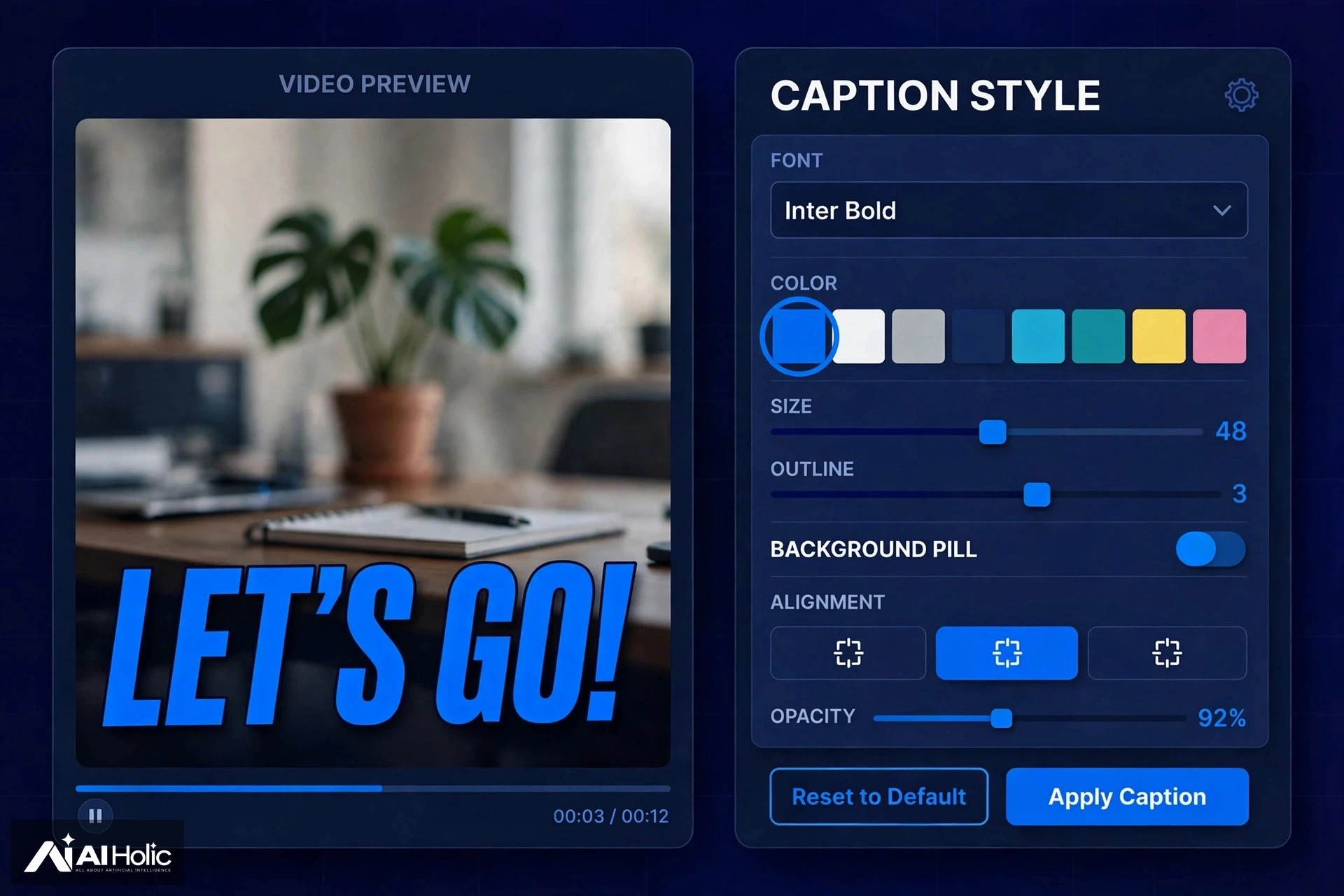
You can change the font, size, color, outline, background box, position, and how many words show on screen at once. That level of control is the point. Social video captions need to match a channel style, and the same look should repeat across every video.
Presets fix the repeat work. You build a look once, save it, and apply it with one click on the next project. The vendor says a saved preset saves about 3 minutes each time you caption a video, a figure that comes from the vendor, not from our own test.
How It Works in 3 Steps
The workflow has three steps, and it all happens inside Final Cut Pro. You do not export audio to another app or upload your project anywhere for the basic flow.
- Analyze your audio. Open the extension from the Extensions menu and run the analysis on your project audio. caption pop ai listens and builds timed captions from the speech it hears.
- Customize the style. Pick your font, colors, outline, background, and position. Save the look as a preset if you plan to use it again.
- Drop the captions on your timeline. Copy the caption titles into your project, where you can move them, trim them, and edit the text like any other title.
That last point matters. Text edits happen in Final Cut Pro after the captions are added, because caption pop ai does not yet offer direct text editing. Plan a quick review pass for names, brand words, and terms the transcription may have missed.
Caption Pop AI Pricing and How to Get It
You get the extension through the Stupid Raisins app, which is free to install. Once installed, you open it from the Extensions menu in Final Cut Pro. You can then buy caption pop ai on its own or get it through a subscription.
| Access option | What you get | Price |
|---|---|---|
| Raisin Hater subscription | The extension plus all 94 Stupid Raisins premium plugins | $19.99 per month or $199 per year |
| Raisin Wrecker subscription | All premium plugins except this extension | $9.99 per month or $99 per year |
| Standalone purchase | The extension on its own | Price not stated on the vendor page |
| Free trial | First five captions export, and cloud transcription model not included | Free |
The standalone price is not listed on the vendor product page, so we do not quote a number here. Check the price inside the app before you buy, since it can change. The vendor states a 30-day money-back guarantee on purchase.
The key fact is the tier split. The cheaper Raisin Wrecker plan does not include this extension, so a subscriber on that tier still needs to buy it separately. Only the Raisin Hater tier includes it.
Final Cut Pro Built-In Captions Compared
Final Cut Pro now ships with its own caption tool, called Transcribe to Captions. It builds captions from spoken English audio and it costs nothing extra. That raises a fair question: why pay for an extension at all?
| Feature | This extension | Built-in Final Cut Pro captions |
|---|---|---|
| Languages | 57 languages | English only |
| Chips supported | Apple Silicon and Intel | Apple Silicon only |
| Styling | Font, color, outline, background, position, word count | Basic font, size, color, simple word highlight |
| Reusable presets | Yes, saved looks apply in one click | No, style is rebuilt each time |
| Text editing | In Final Cut Pro after adding | In Final Cut Pro |
| Cost | Paid, by purchase or subscription | Included with Final Cut Pro |
The built-in tool is the right pick if you caption in English only and you do not mind basic styling. The extension earns its price when you work in more than one language, when you need a fixed channel style, or when you caption often enough that presets save real time.
Captions are only one part of a clean final video. If your footage has compression artifacts, our guide to Topaz Video AI shows how to remove blockiness and artifacts.

Alternatives Worth Knowing
caption pop ai is not the only way to caption Final Cut Pro video. Other tools in the same space solve the same job with different strengths, and one of them may fit your work better. Here are the main names from an independent 2025 roundup.
In this group, caption pop ai sits in the middle for language support and ease of use. The tools below beat it in one area each, so pick by the area that matters most to you.
- mCaptionsAI by MotionVFX: recognizes over 90 languages and can style native Final Cut Pro captions or import SRT files. A strong pick for multilingual work.
- Simon Says: transcribes in 100 languages and adds translation, which this extension does not offer. A good fit for projects that need deliverables in more than one language.
- FinalCap Ultimate: runs fully offline and gives fine control over how subtitles split and format. A good fit for sensitive material that must stay on your machine.
- Caption Cut Pro: adds 3D animated caption styles aimed at social video. The vendor claims around 95 percent transcription accuracy for long footage.
If you want a broader view of video tools before you choose, our roundup of AI tools for Facebook and Instagram ad creatives covers editors and helpers built for social video.
Limits You Should Know Before You Buy
No tool fits everyone, and this one has clear limits. Knowing them before you pay saves a refund request later. Here is the list, drawn from the vendor’s own FAQ.
- No direct text editing inside the extension yet. You fix words in Final Cut Pro after the captions are on the timeline.
- No translation: caption pop ai transcribes speech in the language it hears, so a translated caption track needs a separate step.
- Mac and Final Cut Pro only. It needs macOS 12.3 or later, and it does not work in other editors or on Windows.
- Trial limits. Trial mode exports only the first five captions, and the cloud transcription model is not available until you pay.
- Accuracy needs a review pass. AI transcription can miss names, brand words, and jargon, so check the text before you export.
One more point causes confusion. A separate Android app named CaptionPop is in Google Play testing, and it is a different product from a different maker. Do not mix the two up when you search for reviews or download links.
Who Should Use It (and Who Should Skip It)
This extension fits editors who caption Final Cut Pro video every week. Short-form creators, YouTube educators, and social media teams gain the most, because presets and 57 languages cut repeat work. If your channel uses one caption style across dozens of clips, the time saved adds up fast.
It also fits editors who work in more than one language. The built-in Final Cut Pro tool stops at English, so a second language on its own can justify the price. Our guide to Videographer AI covers another video helper if you want to compare helpers before you commit.
Skip it if you caption in English only, a few times a month, and you are happy with plain styling. The built-in tool covers that job for free. Skip it too if you need translation in the same step, since this tool does not translate yet.
Watch: Auto Captions in Action
The vendor demo below shows the extension at work inside Final Cut Pro. Watch how the captions are built, styled with a preset, and dropped on the timeline.
Frequently Asked Questions
What is Caption Pop AI?
It is a Final Cut Pro extension by Stupid Raisins that turns spoken audio into styled captions inside your timeline. It transcribes in 57 languages, and it works on Apple Silicon and Intel Macs.
How much does it cost?
You can buy it on its own or get it through the Raisin Hater subscription at $19.99 per month or $199 per year. The standalone price is not listed on the vendor page. The cheaper Raisin Wrecker plan at $9.99 per month does not include it.
Does it translate captions into other languages?
No. It transcribes speech in the language it hears, and translation is not offered yet. If you need a translated track, use a tool that translates, such as Simon Says.
Can I edit the captions after they are made?
Not inside the extension yet. You edit the text in Final Cut Pro after the captions are added to your timeline, just like any other title.
Is it the same as the CaptionPop app for Android?
No. CaptionPop is a separate Android app in Google Play testing, made by a different maker. The Final Cut Pro extension and the Android app share a similar name but are not the same product.
Conclusion
Caption Pop AI is a focused tool for Final Cut Pro editors who caption often or in more than one language. Its presets and 57 languages are the real draw, while the lack of translation and in-tool editing are the real limits. Try the trial, test it on your own footage, and buy only if it saves you time.