
AI Powered Workflows NZ: Practical Automation Ideas for New Zealand Teams
If you don’t want to read the whole guide or have difficulty reading, you can listen to this guide instead.
A small New Zealand team can lose hours each week to repeat work, with enquiries sitting unanswered, invoices waiting for manual chasing, and follow-ups slipping when the day gets busy. With ai powered workflows nz, you can hand those repeat steps to software while your team keeps control of prices, promises, and final decisions. At AI Holic, this guide explains what these workflows do, which ones to start with, and how to set one up without a large budget or a technical team.
You do not need to automate your whole business at once. One clear workflow, tested on real jobs for two weeks, teaches you more than five half-built systems. The rest of this guide covers definitions, five starting workflows, a setup plan, NZ cost and privacy notes, and costly mistakes.
What ai powered workflows nz mean in plain terms
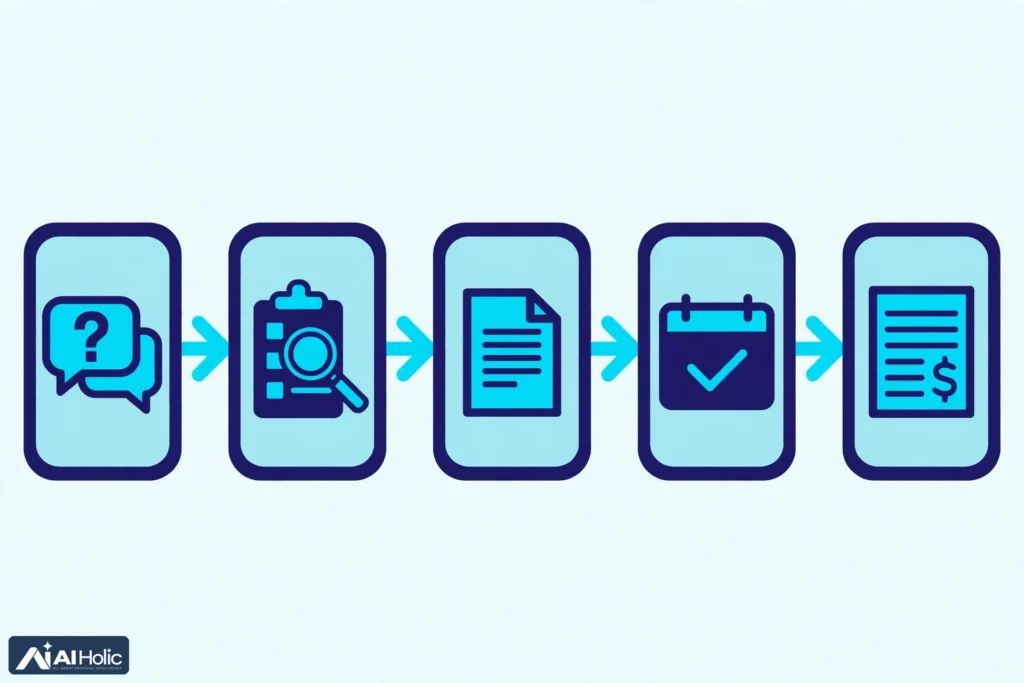
A workflow is a repeat set of steps that turns an input into a result. An enquiry becomes a booked job, a finished job becomes an invoice, and an invoice becomes a paid account. An AI step sits inside that chain and handles one defined job, such as drafting a reply or sorting a request.
The AI part does not replace the whole chain. It prepares, sorts, drafts, or checks, and a person reviews the result at the points that matter. Full automation of prices, refunds, and legal promises creates risk that a small team cannot afford.
This idea sits inside a wider field called business process automation, which covers software that runs repeat business steps with less manual effort. AI adds judgement to that base, so the system can handle messy inputs like free-text emails instead of only neat, fixed fields.
Three parts make a workflow work in practice. A trigger starts it, such as a new web form, an email, or a calendar event, and one or more AI steps then prepare the next action, such as a draft reply or a sorted task list. A human check or a fixed rule sends the result onward, such as booking the job or sending the invoice.
| Everyday workflow | Manual step today | AI step in the chain | Human check |
|---|---|---|---|
| New enquiry | Read each email and type a fresh reply | Sort the request and draft a reply from approved facts | Price, date, and promise |
| Booking and reminders | Phone calls and calendar chasing | Confirm the slot and send reminders on schedule | Changes to time, staff, or scope |
| Invoicing | Copy job details into an invoice by hand | Pull job facts into a draft invoice | Amounts and tax details |
| Follow-up | Remember who still needs a reply | Flag quiet leads and draft a follow-up | Tone and offer |
| Job notes | Rewrite notes after each visit | Turn rough notes into a tidy job record | Facts and safety notes |
Five workflows NZ small teams start with
Start with work that repeats often, costs real time, and carries low risk when a draft is wrong. A wrong draft reply can be fixed before sending, while a wrong payment cannot be undone as easily. That test keeps your first project safe.
Enquiry replies and lead sorting
Most small NZ firms lose leads in the gap between first contact and first reply. An AI step can sort each enquiry by type, such as quote request or booking change, and draft a reply from facts you already approved. Your team then checks the price and date, and sends the reply in minutes instead of hours.
Booking, reminders, and no-show follow-up
Missed appointments cost trades, clinics, and service firms both time and income. A booking workflow can confirm the slot at once, send a reminder before the visit, and follow up when a customer misses the slot. Each message should give the customer one clear way to reschedule.
Quotes, invoices, and payment chasing
Quote and invoice work suits automation because the facts already exist in your job notes, price list, or accounting tool. An AI step can pull those facts into a draft quote or invoice, and your team checks the amounts before sending. Payment chasing can then run on a fixed schedule with polite reminders at set intervals.
NZ firms often run this workflow through accounting tools they already use, such as Xero or MYOB, with an automation tool joining the steps together. Keep invoice facts in one place, so the draft never pulls an old price or a wrong job address.
Content and publishing support
Content work also follows a repeat chain, from a rough brief to a draft, a check, and a publish step. An AI step can turn notes into a first draft or tidy a rough post for review. A person must still check facts, tone, and claims, because a published error costs far more than a slow draft.
Our guide to publishing workflows shows how that chain looks for writers and editors, with checks at each stage.
A simple setup plan in five steps
The best setup plan for ai powered workflows nz starts with one workflow and one clear measure of success. You might aim to cut reply time, cut no-shows, or cut invoice chasing time. Pick one measure, write it down, and judge the workflow against it after two weeks of real use.
- Pick one painful repeat task. Choose a task your team does at least five times a week and dislikes, such as enquiry replies or invoice chasing.
- Map the steps on one page. Write the trigger, each step, each tool, and each approval point in plain order, with no step left vague.
- Set the human checks first. Name who checks prices, promises, refunds, and customer data before anything goes out.
- Build the smallest version. Connect two or three tools, test with five real cases, and fix errors before you add more steps.
- Measure for two weeks. Track time saved, errors found, and customer replies, then decide whether to keep, fix, or stop the workflow.
If your workflow touches code or developer tools, our comparison of coding agent tools can help you judge agent-style tools before you commit to one. Run it on your own cases, not on the vendor demo cases.
| Setup stage | What to do | What good looks like |
|---|---|---|
| Choose | Pick one repeat task with a clear owner | One workflow, one owner, one measure |
| Map | List trigger, steps, tools, and checks | A one-page map any team member can follow |
| Build | Connect the smallest set of tools first | A working draft flow tested on real cases |
| Check | Review outputs daily in week one | Errors caught before customers see them |
| Decide | Keep, fix, or stop after two weeks | A clear choice based on time and error data |

Costs, tools, and NZ practical points
Costs vary widely, so treat any single price claim with care. Many small teams start with tools they already pay for, such as email, calendar, and accounting tools, plus one automation tool that joins them together. That path keeps the monthly cost low and avoids a large new system that no one fully uses.
Check the monthly fee for your team size, the cost of any paid AI use inside the tool, and the time cost of setup and fixes. Per-user pricing adds up fast, and high message volumes can lift the bill. A tool that needs constant repair is not cheap.
NZ context changes a few practical details for ai powered workflows nz. Time zones matter when you serve customers abroad, so set reminder and reply times in local time and state them clearly. Public holidays in New Zealand also change reply expectations, so pause auto-replies and reminders around those dates, and keep payment and tax details in your accounting tool so the numbers come from one checked source.
Privacy and customer trust in New Zealand
Automation moves customer data between tools, so privacy checks for ai powered workflows nz belong in the design, not at the end. Collect only the facts the workflow needs, keep them only as long as the job needs them, and limit staff access to the data each role truly needs. When a workflow no longer needs a data field, remove it from the flow.
New Zealand privacy law sets principles for how businesses collect, store, use, and share personal information. The official privacy principles give a plain starting point for checking your workflow against those duties. Read them before you connect a new tool to customer data, and note where your data will be stored.
Customer trust also needs clear communication. Tell customers when an automated reply handles their first message, and give them a simple path to reach a person. Most complaints start when automation pretends to be a person or hides the path to help.
Compliance work follows the same pattern, since evidence and records must stay clear even when software gathers them. Our guide to AI agents for compliance checks explains where agent tools help with audit evidence and where human review must stay in place.
Mistakes that waste the most time
The most common error with ai powered workflows nz is automating a messy process instead of fixing it first. If the manual steps are unclear, the automated version will repeat the same confusion faster. Fix the map, name the owner, and agree on the checks before you connect any tool.
- Automating five workflows at once. Start with one, prove it, and only then add a second.
- Skipping the human check on prices and promises. A fast wrong reply costs more trust than a slow right reply.
- Letting the AI invent facts. Feed it only approved facts, and block it from guessing prices, dates, or policy terms.
- Storing customer data in too many tools. Keep one main record, and let other tools read from it rather than copy it.
- Measuring nothing after launch. Without time and error data, you cannot tell whether the workflow helps or hurts.
Frequently Asked Questions
Do ai powered workflows nz work for a one-person business?
Yes, and a solo operator often gains the most, since no team absorbs the repeat work. Start with enquiry replies or reminders, since those two workflows save time every day. Keep the human check in place, because only you can fix a wrong price or promise.
How long does a first workflow take to set up?
A simple workflow often takes a few hours to map and build, plus one week of daily checks. Complex workflows that join many tools or handle payments take longer, since each link needs testing. Start simple, and expand only after the first workflow runs cleanly.
Do I need coding skills to build one?
No, most small-team tools use visual builders with triggers, steps, and rules you set by choosing options. You still need a clear map of your process and a named person to check outputs. Coding helps for unusual links, but it is not required for the starting workflows in this guide.
What data should I never put through an AI step?
Keep passwords, full bank details, and sensitive health or legal facts out of general AI workflows. Limit customer data to what the step needs, and check where the tool stores that data. For sensitive facts, use a tool with clear access controls and a written data agreement.
How do I know if a workflow is actually saving time?
Measure one thing before and after you launch ai powered workflows nz, such as reply time, no-show rate, or hours spent chasing invoices. Record the before number for one week, then the after number for two weeks. If time saved is smaller than time spent fixing errors, change the workflow or stop it.
Conclusion
Pick one repeat task, map it on one page, add a human check, and test it for two weeks. That small loop is how ai powered workflows nz turn from a nice idea into real time saved for your NZ team.
Once that first workflow is running cleanly, a store team can take the same idea further with the shopify flow ai assistant prompt guide, which shows how to turn one clear job into a tested trigger, condition, and action prompt.
If you want the Clay side of this in detail, our guide to clay automation templates lead routing clay.ai triggers rules walks through five copyable templates, the triggers that start them, and the rules that route each lead to the right rep.
AI and digitalization is the wider change behind these workflows: once records and steps are digital, AI can read them, automate the repeated parts, and help the team decide faster. Our beginner guide explains what that change means and how to start with one small job.